
Keep the tools that work
Already have a dashboard or agents? We assess what to keep, connect or extend before agreeing the build.
Client-owned AI systems for e-commerce
We connect your tools and build AI agents to handle repetitive work across support, static ad production, email and reporting. You review the work and approve key actions from one dashboard.
You’re still writing prompts, copying information between tools and starting the next task yourself. You know AI could do more for your business. You just don’t have the time or expertise to connect it all.
Your custom AI team
We create agents for the roles you need, built around your company’s knowledge, tools and processes. Each has a clear job and works with the rest of your AI team.
Loading the office…
Drag to explore · scroll to zoom · right-drag to pan.Drag to explore · pinch to zoom · two fingers to pan. Select an agent to look closer.
Illustrative demoConnects specialists around the selected workflow and brings decisions back to your team.
Organizes approved product assets and reference ads for a brief.
Proposes static-ad concepts from the supplied product and brand direction.
Prepares accompanying copy using approved product facts and claims.
Prepares static variations in the formats agreed for the workflow.
Flags product, format and brand issues against agreed review criteria.
Classifies requests and routes exceptions to the right owner.
Uses approved knowledge to prepare a useful response.
Brings order and delivery context into a customer request.
Prepares a policy-based resolution and flags exceptions.
Finds recurring themes across customer conversations.
Organizes the campaign instructions, offer facts and required assets.
Prepares campaign copy using the supplied brand and product direction.
Places approved content into the email templates selected for the workflow.
Maps a selected lifecycle use case to agreed triggers, timing and exclusions.
Flags missing links, product details or required exclusions before review.
Organizes the agreed store data using the selected dates and definitions.
Compares agreed platform and campaign measures within their attribution limits.
Flags missing cost inputs against the agreed profitability definitions.
Checks supported product mappings and identifies unmatched records.
Brings agreed business and marketing measures into a consistent report.
Flags proposed replies or order actions that need the designated human.
Collects selected assets, copy and unresolved feedback for the approver.
Checks the configured approval requirement before an email action proceeds.
Brings unsupported requests and missing inputs to the responsible person.
Checks proposed actions against the boundaries configured for the workflow.
Organizes approved reference material and flags gaps.
Prepares document updates when confirmed context changes.
Organizes approved product facts and flags conflicting claims.
Retrieves relevant information with its source context.
Surfaces recurring exceptions and suggests improvements.
Illustrative roles and sample context for e-commerce workflows. No actions run here. Roles and permissions are scoped for your business.
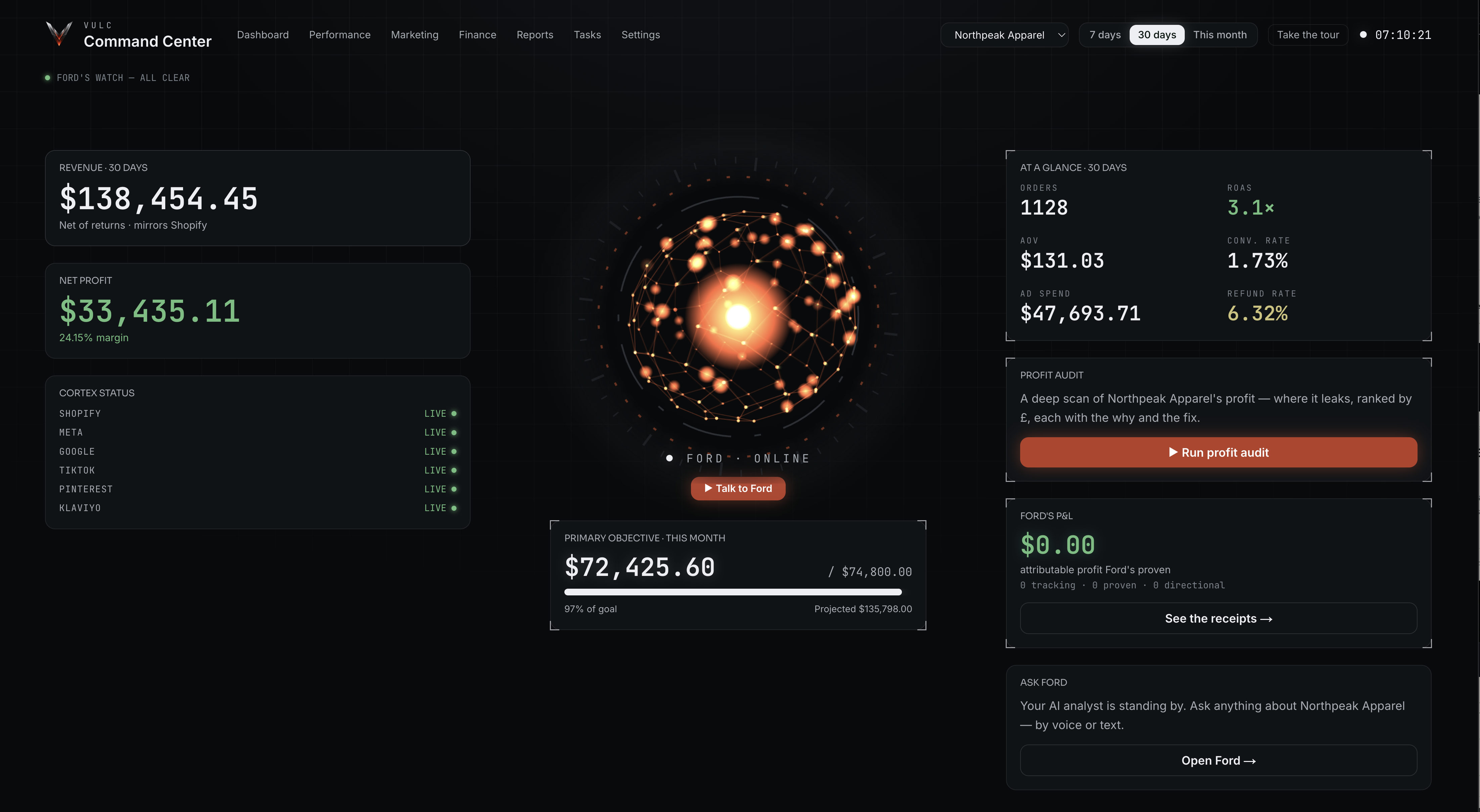
We build a dashboard that brings your AI agents, Shopify, marketing channels and other key tools together. Review your agents’ work and business performance in one place.
Already have a dashboard or agents? We assess what to keep, connect or extend before agreeing the build.
Your accounts, source code and handover documentation stay under your control, subject to the agreement and vendor licenses.
Set separate rules for replies, refunds and campaign sends. Your team handles the exceptions.
Four areas of e-commerce
Start with one workflow or connect several. See what changes in support, static ads, email and reporting.
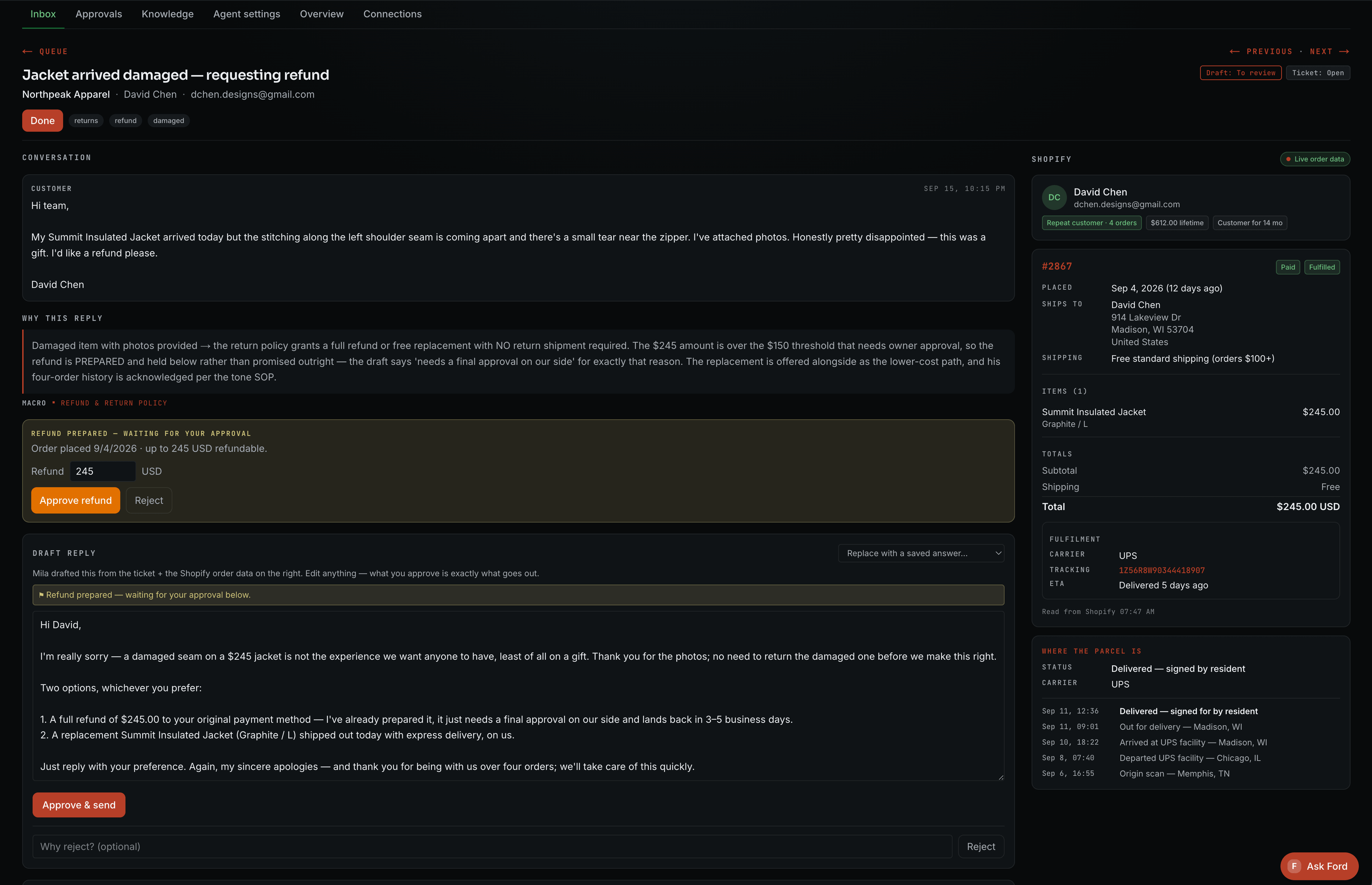
Bring the order, tracking and support policy into one view. Let agents prepare replies and handle permitted actions, with exceptions sent to your team.
Explore customer supportUse your product imagery, brand guidelines and creative brief to prepare static ads and copy. Review the batch and download your picks.
Explore static creative productionTurn your product details and campaign brief into an email preview. Review the copy and design before the agreed Klaviyo handoff.
Explore email marketing automation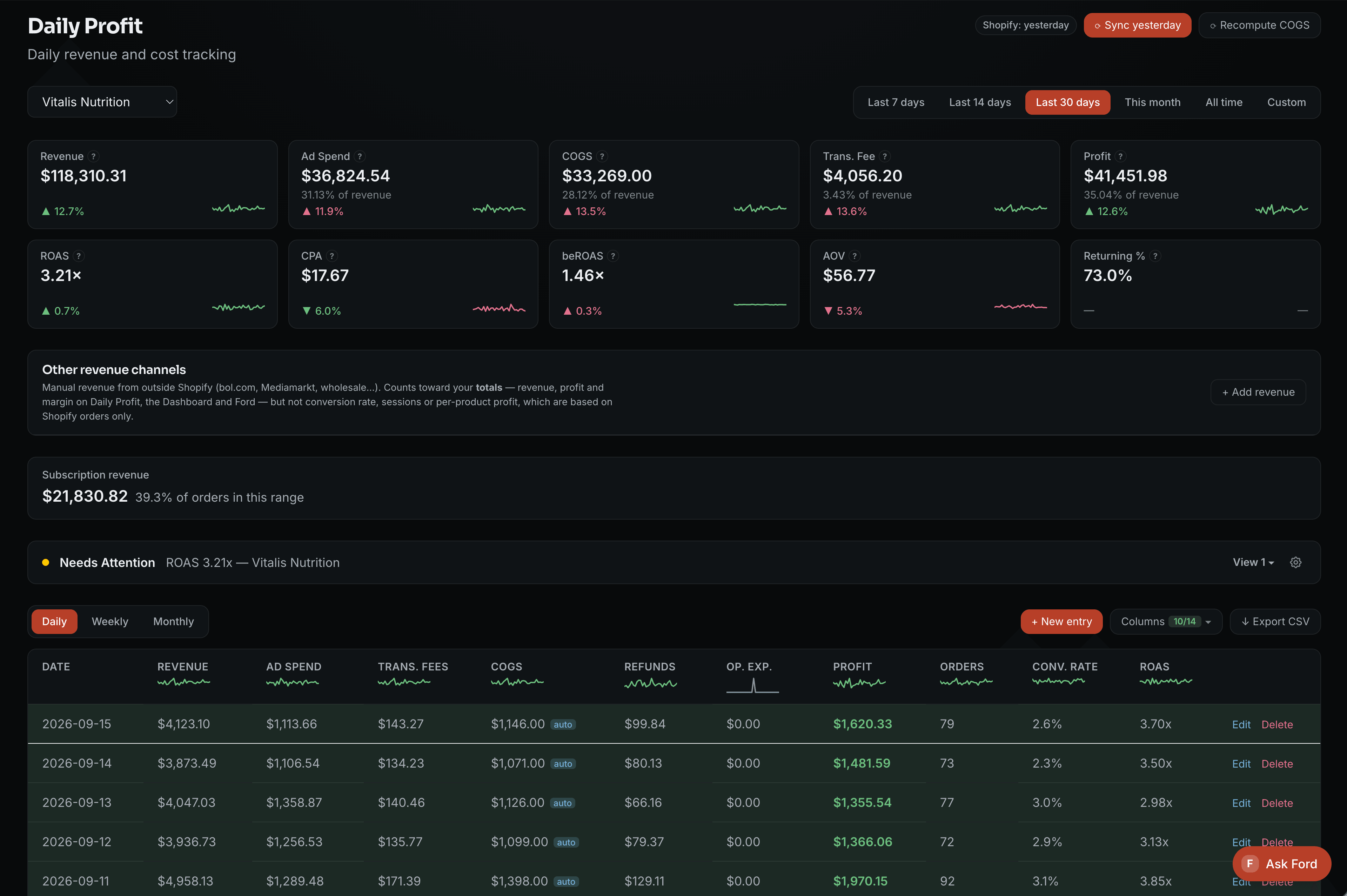
Bring agreed data into one dashboard. Compare business, channel and campaign performance without assembling the report yourself.
Explore reportingAI built around your business
Cinematic illustration · No live system actions
We look at what takes your time, check your tools and agree what to build and what it will cost.
You provide access, business rules and feedback. We connect the tools, build the agents and test the workflow with you.
Fourteen days of included stabilization come with your build. Optional ongoing management adds responsive support, regular system reviews and agreed refinements to the installed workflows.
Your build is quoted after the call. Ongoing management is optional and priced separately.
See the process, payment and service termsMeet the founder
I’m Maarten, founder of Vulc. I’ve spent four years in e-commerce, generating multiple seven figures in annual revenue.
That led me to build a central dashboard with AI, originally as a SaaS product. Today, I focus on custom dashboards and AI agents for seven- and eight-figure e-commerce businesses, built around their tools, processes and the work they want to hand over.
Explore the original dashboard
We assess what you have first. Useful tools and agents can stay where the connections and permissions support the work. Any gaps or changes are part of the agreed scope.
Yes. Start with the work that matters most. More workflows, integrations or stores can be added through a separate scope and quote.
Access to the relevant tools, your business rules, assets and someone to give feedback and approve the build. We handle implementation; your team supplies the decisions and context.
Yes, for actions you authorize. A routine reply can follow approved rules, while a refund or an exception can require human review. We agree those permissions before launch.
After our call, you receive a custom quote for the build and any optional ongoing management before committing. The build is paid 50% upfront and 50% at accepted delivery. Ongoing management is optional. If chosen, it is paid monthly in advance and renews monthly. You can end it with 14 calendar days’ notice before renewal. Vendor subscriptions and usage remain separate where applicable.
The delivered system stays in your accounts. Ongoing management is optional. If you choose it, you can end it with 14 calendar days’ notice before renewal. Your business then takes responsibility for maintenance and vendor costs.